Tuesday, 5 December 2017

How to install sublime text editor on CentOS 7

How to install sublime text editor on CentOS 7

To install Sublime Text Editor on CentOS 7

Sublime Text is a cross-platform source code editor developed based on Python's Application Programming Interface (API). It supports many programming and markup languages and its functionality can be extended with the addition of surportive plugins, which are community-built and maintained under free-software licenses. In this tutorial you will be briefed about the installation of Sublime Text Editor on CentOS 7.

Features:-
  • Goto Anything," quick navigation to files, symbols, or lines 
  • "Command palette" uses adaptive matching for quick keyboard invocation of arbitrary commands 
  • Simultaneous editing: simultaneously make the same interactive changes to multiple selected areas 
  • Python-based plugin API 
  • Project-specific preferences 
  • Extensive customizability via JSON settings files, including project-specific and platform-specific settings 
  • Cross platform (Windows, OS X, Linux) 
  • Compatible with many language grammars from TextMate

Installing Sublime Text Editor

Let us begin by downloading the rpm of Sublime Editor by using the following command.
[root@localhost Desktop]# rpm -v --import https://download.sublimetext.com/sublimehq-rpm-pub.gpg

One it is downloaded, add the required repo file for sublime text editor to your machine as follows.
[root@localhost Desktop]# yum-config-manager --add-repo https://download.sublimetext.com/rpm/stable/x86_64/sublime-text.repo
Loaded plugins: fastestmirror, langpacks
adding repo from: https://download.sublimetext.com/rpm/stable/x86_64/sublime-text.repo
grabbing file https://download.sublimetext.com/rpm/stable/x86_64/sublime-text.repo to /etc/yum.repos.d/sublime-text.repo
sublime-text.repo                                                             |  192 B  00:00:00     
repo saved to /etc/yum.repos.d/sublime-text.repo
Now is the time to install the Sublime Text Editor. You can do it by running the following command.
[root@localhost Desktop]# yum install sublime-text -y
Loaded plugins: fastestmirror, langpacks
base                                                                          | 3.6 kB  00:00:00     
epel/x86_64/metalink                                                          | 4.8 kB  00:00:00     
epel                                                                          | 4.3 kB  00:00:00     
extras                                                                        | 3.4 kB  00:00:00    
.
.
.
  Installing : sublime-text-3126-1.x86_64                                                        1/1 
  Verifying  : sublime-text-3126-1.x86_64                                                        1/1 

Installed:
  sublime-text.x86_64 0:3126-1                                                                       

Complete!


Sublime Text Editor has been installed. You can launch it with the help of the following command from your terminal.
[root@localhost Desktop]# subl

Monday, 4 December 2017

Installing and Using PGP with GNU Privacy Guard (GnuPG) on RHEL 6.3

Introduction

In this blog I will show you how to use PGP client GNU Privacy Guard (GnuPG) on RHEL 6.3. PGP can be used to encrypt files which can be stored somewhere on remote disc or by sending as attached files.

Installation

Installation was quite smooth, except founding the missing dependency package pinentry-gtk, which should be installed automatically.
?
1
$ yum install gnupg2 pinentry-gtk

Test your installation

A simple test to see that GnuPG is installed properly is to ask for each version.
?
1
2
3
4
5
6
7
8
9
10
11
12
13
14
15
$ gpg --version
gpg (GnuPG) 2.0.14
libgcrypt 1.4.5
Copyright (C) 2009 Free Software Foundation, Inc.
License GPLv3+: GNU GPL version 3 or later <http://gnu.org/licenses/gpl.html>
This is free software: you are free to change and redistribute it.
There is NO WARRANTY, to the extent permitted by law.
 
Home: ~/.gnupg
Supported algorithms:
Pubkey: RSA, ELG, DSA
Cipher: 3DES, CAST5, BLOWFISH, AES, AES192, AES256, TWOFISH, CAMELLIA128,
        CAMELLIA192, CAMELLIA256
Hash: MD5, SHA1, RIPEMD160, SHA256, SHA384, SHA512, SHA224
Compression: Uncompressed, ZIP, ZLIB, BZIP2

Setup

Creating Private Key Pair

The first thing to do, after installation was successful, is to generate the necessary keys used for encrypting and decrypting files. To generate you private key pair, do the following.
?
1
2
3
4
5
6
7
8
9
10
11
12
13
14
15
16
17
18
19
20
21
22
23
24
25
26
27
28
29
30
31
32
33
34
35
36
$ gpg --gen-key
gpg (GnuPG) 2.0.14; Copyright (C) 2009 Free Software Foundation, Inc.
This is free software: you are free to change and redistribute it.
There is NO WARRANTY, to the extent permitted by law.
 
Please select what kind of key you want:
   (1) RSA and RSA (default)
   (2) DSA and Elgamal
   (3) DSA (sign only)
   (4) RSA (sign only)
Your selection?
RSA keys may be between 1024 and 4096 bits long.
What keysize do you want? (2048)
Requested keysize is 2048 bits
Please specify how long the key should be valid.
         0 = key does not expire
      <n>  = key expires in n days
      <n>w = key expires in n weeks
      <n>m = key expires in n months
      <n>y = key expires in n years
Key is valid for? (0) 2y
Key expires at Thu 15 Jan 2015 08:39:54 PM CET
Is this correct? (y/N) y
 
GnuPG needs to construct a user ID to identify your key.
 
Real name: YOUR NAME
Email address: your.name@domain.com
Comment:
You selected this USER-ID:
    "YOUR NAME <your.name@domain.com>"
 
Change (N)ame, (C)omment, (E)mail or (O)kay/(Q)uit? O
You need a Passphrase to protect your secret key.
 
etc.

Exporting Public Key

To be able to receive encrypted files, you need to export your public key. The text files generated below can be emailed as attachment or more preferable distributed in a more secure way, such as manually handed over via USB memory.
?
1
gpg --armor --output "key.txt" --export "YOUR NAME"

Usage

Now you are ready to use GnuPG. A good tutorial guide for the most common usage can be found here http://www.glump.net/howto/gpg_intro.

Troubleshooting

Sunday, 26 November 2017

How to Install or Upgrade to Kernel 4.14 in CentOS 7

I needed to update the kernel to solve some issues that my laptop is facing. Some touchpad issues and compatibility, security and performance issues. Not sure, if it is going to solve the problems but this kernel promises a longer support period, so I decided to update the mainline version of it.
This article below is adapted from https://www.tecmint.com/install-upgrade-kernel-version-in-centos-7/

Although some people use the word Linux to represent the operating system as a whole, it is important to note that, strictly speaking, Linux is only the kernel. On the other hand, a distribution is a fully-functional system built on top of the kernel with a wide variety of application tools and libraries.
During normal operations, the kernel is responsible for performing two important tasks:
  1. Acting as an interface between the hardware and the software running on the system.
  2. Managing system resources as efficiently as possible.
To do this, the kernel communicates with the hardware through the drivers that are built into it or those that can be later installed as a module.
For example, when an application running on your machine wants to connect to a wireless network, it submits that request to the kernel, which in turns uses the right driver to connect to the network.
With new devices and technology coming out periodically, it is important to keep our kernel up to date if we want to make the most of out them. Additionally, updating our kernel will help us to leverage new kernel functions and to protect ourselves from vulnerabilities that have been discovered in previous versions.
Ready to update your kernel on CentOS 7 or one of their derivatives such as RHEL 7 and Fedora? If so, keep reading!

Step 1: Checking Installed Kernel Version

When we install a distribution it includes a certain version of the Linux kernel. To show the current version installed on our system we can do:
# uname -sr
The following image shows the output of the above command in a CentOS 7 server:
Check Kernel Version in CentOS 7
If we now go to https://www.kernel.org/, we will see that the latest kernel version is 4.14 at the time of this writing (other versions are available from the same site).
This new Kernel 4.14 version is a long-term release and will be supported for 6 years, earlier all Linux Kernel versions were supported for 2 years only.
One important thing to consider is the life cycle of a kernel version – if the version you are currently using is approaching its end of life, no more bug fixes will be provided after that date. For more info, refer to the kernel Releases page.

Step 2: Upgrading Kernel in CentOS 7

Most modern distributions provide a way to upgrade the kernel using a package management system such as yum and an officially-supported repository.
However, this will only perform the upgrade to the most recent version available from the distribution’s repositories – not the latest one available in the https://www.kernel.org/. Unfortunately, Red Hat only allows to upgrade the kernel using the former option.
As opposed to Red Hat, CentOS allows the use of ELRepo, a third-party repository that makes the upgrade to a recent version a kernel.
To enable the ELRepo repository on CentOS 7, do:
# rpm --import https://www.elrepo.org/RPM-GPG-KEY-elrepo.org
# rpm -Uvh http://www.elrepo.org/elrepo-release-7.0-3.el7.elrepo.noarch.rpm 
Enable ELRepo in CentOS 7
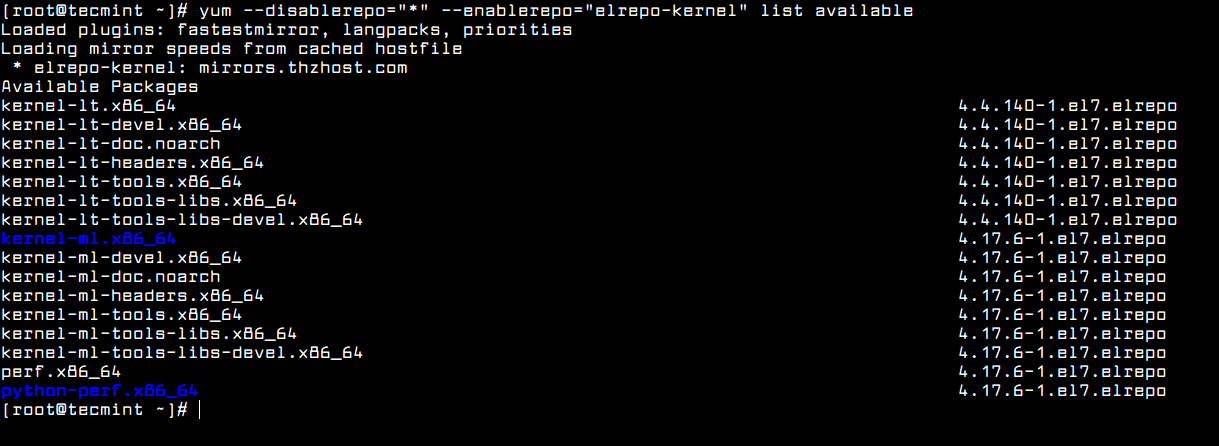
Once the repository has been enabled, you can use the following command to list the available kernel.related packages:
# yum --disablerepo="*" --enablerepo="elrepo-kernel" list available
Yum - Find Available Kernel Versions
Yum – Find Available Kernel Versions
Next, install the latest mainline stable kernel:
# yum --enablerepo=elrepo-kernel install kernel-ml
Install Latest Kernel Version in CentOS 7
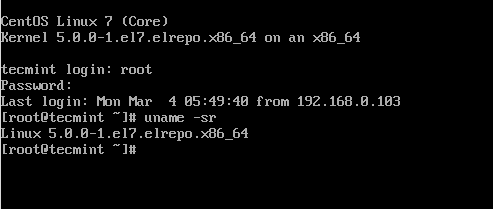
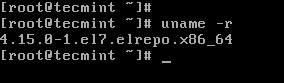
Finally, reboot your machine to apply the latest kernel, and then run following command to check the kernel version:
uname -sr
Verify Kernel Version

Step 3: Set Default Kernel Version in GRUB

To make the newly-installed version the default boot option, you will have to modify the GRUB configuration as follows:
Open and edit the file /etc/default/grub and set GRUB_DEFAULT=0. This means that the first kernel in the GRUB initial screen will be used as default.
GRUB_TIMEOUT=5
GRUB_DEFAULT=0
GRUB_DISABLE_SUBMENU=true
GRUB_TERMINAL_OUTPUT="console"
GRUB_CMDLINE_LINUX="rd.lvm.lv=centos/root rd.lvm.lv=centos/swap crashkernel=auto rhgb quiet"
GRUB_DISABLE_RECOVERY="true"
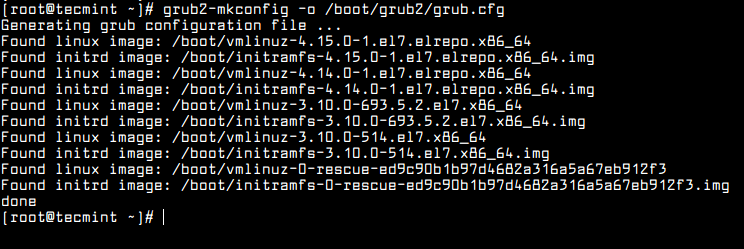
Next, run the following command to recreate the kernel configuration.
# grub2-mkconfig -o /boot/grub2/grub.cfg
Set Kernel in GRUB
Set Kernel in GRUB
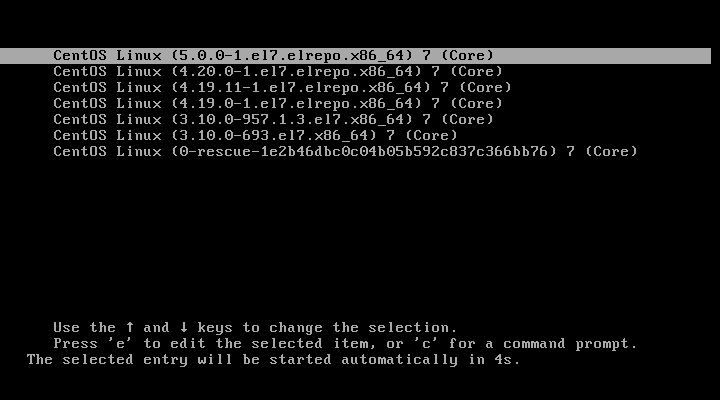
Reboot and verify that the latest kernel is now being used by default.
Booting Default Kernel Version in CentOS 7
Congratulations! You have upgraded your kernel in CentOS 7!
Summary
In this article we have explained how to easily upgrade the Linux kernel on your system. There is yet another method which we haven’t covered as it involves compiling the kernel from source, which would deserve an entire book and is not recommended on production systems.
Although it represents one of the best learning experiences and allows for a fine-grained configuration of the kernel, you may render your system unusable and may have to reinstall it from scratch.
If you are still interested in building the kernel as a learning experience, you will find instructions on how to do it at the Kernel Newbies page.
As always, feel free to use the form below if you have any questions or comments about this article.

How to Install xrdp on CentOS 7 / RHEL 7

From http://www.itzgeek.com/how-tos/linux/centos-how-tos/install-xrdp-on-centos-7-rhel-7.html
xrdp is an Open Source Remote desktop Protocol server, which allows you to RDP to your Linux server from Windows machine; it is capable of accepting connections from rdesktop, freerdp, and remote desktop clients. This how to will help you to setup xrdp server on CentOS 7 / RHEL 7.

Prerequisites

1. This post was written when xrdp is available neither on CentOS repositories nor EPEL repository, after a lot of Google search; I found desktop repository (http://li.nux.ro/) which was having xrdp for CentOS 7 / RHEL 7. We need to manually setup the repository on CentOS 7.
2. Don’t forget to install Gnome on CentOS 7
3. Install and configure EPEL repository.
rpm -Uvh https://dl.fedoraproject.org/pub/epel/epel-release-latest-7.noarch.rpm
4. Add nux repository.
Automatic (recommended)
rpm -Uvh http://li.nux.ro/download/nux/dextop/el7/x86_64/nux-dextop-release-0-1.el7.nux.noarch.rpm
Manual
Create a repository file.
vi /etc/yum.repos.d/xrdp.repo
Place the following content. Once added, save and close the file.
[xrdp]
name=xrdp
baseurl=http://li.nux.ro/download/nux/dextop/el7/x86_64/
enabled=1
gpgcheck=0

Install xrdp on CentOS 7

Issue the  following command to install xrdp
yum -y install xrdp tigervnc-server
You will get the following output, make sure you are getting the package from the newly created repository.
 --> Running transaction check
---> Package xrdp.x86_64 0:0.6.1-2.el7.nux will be installed
--> Finished Dependency Resolution

Dependencies Resolved

================================================================================
Package        Arch             Version                   Repository      Size
================================================================================
Installing:
xrdp           x86_64           0.6.1-2.el7.nux           xrdp           271 k

Transaction Summary
================================================================================
Install  1 Package

Total download size: 271 k
Installed size: 1.5 M
Is this ok [y/d/N]: y
Downloading packages:
xrdp-0.6.1-2.el7.nux.x86_64.rpm                            | 271 kB   00:05
Running transaction check
Running transaction test
Transaction test succeeded
Running transaction
Installing : xrdp-0.6.1-2.el7.nux.x86_64                                  1/1
Verifying  : xrdp-0.6.1-2.el7.nux.x86_64                                  1/1

Installed:
xrdp.x86_64 0:0.6.1-2.el7.nux
Once it is installed, lets start the xrdp service.
systemctl start xrdp.service
xrdp will listen on 3389, lets confirm this by issuing following command.
# netstat -antup | grep xrdp
Output:
tcp        0      0 0.0.0.0:3389            0.0.0.0:*               LISTEN      1508/xrdp
tcp        0      0 127.0.0.1:3350          0.0.0.0:*               LISTEN      1507/xrdp-sesman
By default, services wont auto start after system reboot. Issue the following command to enable the service at system start up.
systemctl enable xrdp.service
Next is to create iptables rule to allow RDP connection from the external machines, following command will add the exception for RDP port (3389).
firewall-cmd --permanent --zone=public --add-port=3389/tcp
firewall-cmd --reload
Configure SELinux
# chcon --type=bin_t /usr/sbin/xrdp
# chcon --type=bin_t /usr/sbin/xrdp-sesman

Test Remote Connectivity

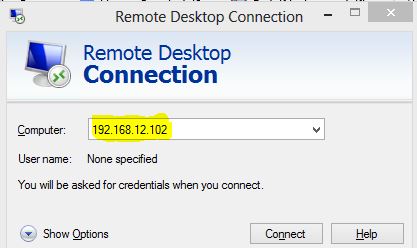
Now take RDP from any windows machine using Remote Desktop Connection, enter the ip address of Linux server in the computer field and click on connect.

Install xrdp on CentOS 7 - xrdp MSTSC
Install xrdp on CentOS 7 – xrdp MSTSC
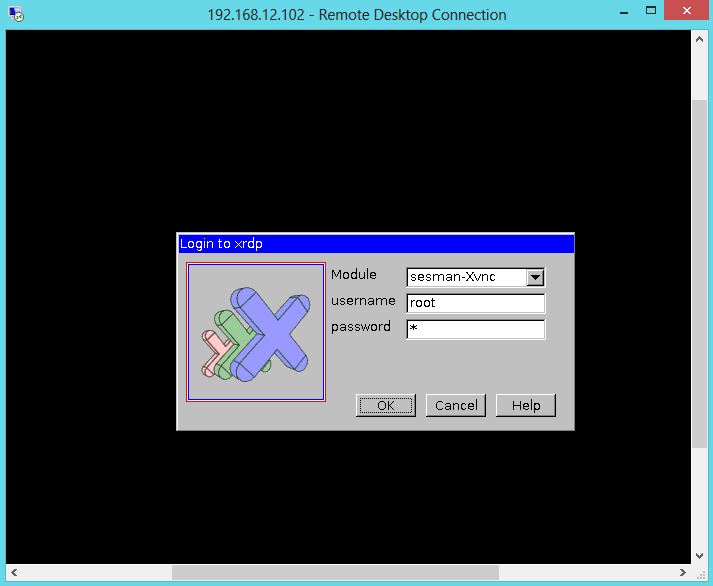
You would be asked to enter the user name and password. You can either use root or any user that you have it on the system. Make sure you use module “sesman-Xvnc”.

Install xrdp on CentOS 7 - xrdp Login page
Install xrdp on CentOS 7 – xrdp Login page
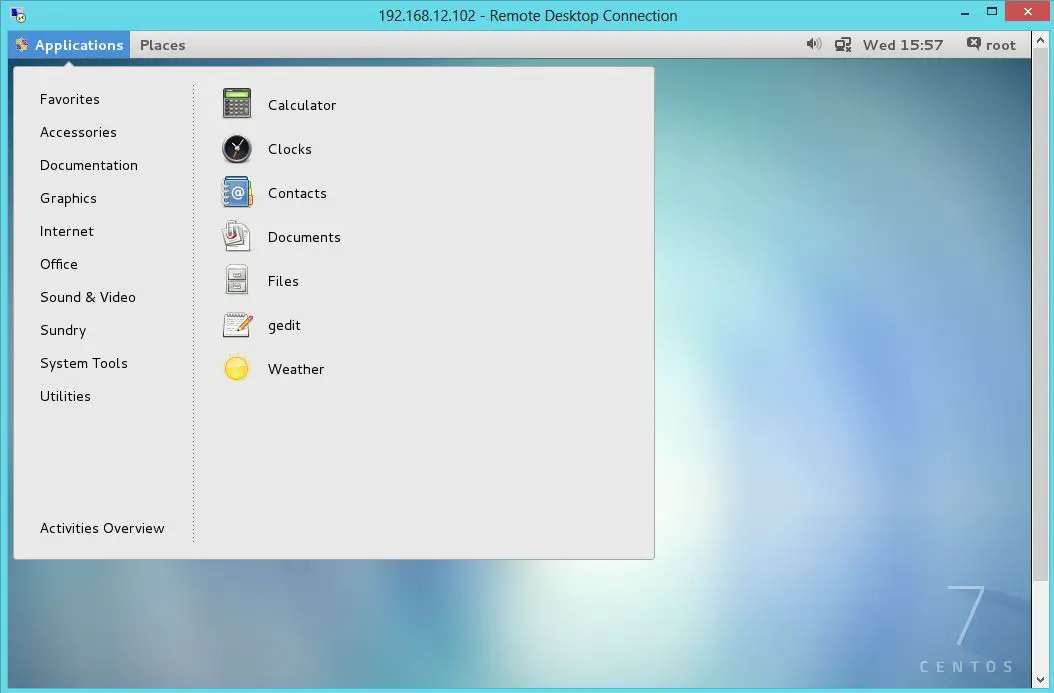
If you click ok, you will see the processing. In less than a half min, you will get a desktop.

Install xrdp on CentOS 7 - xrdp Desktop
Install xrdp on CentOS 7 – xrdp Desktop
That’s All. You have successfully configured xRDP on CentOS 7 / RHEL 7. We welcome your comments.